Author: Chip Bennett
-
Twitter Updates for 2010-10-03
- Rain, rain go away! There is no rain at Homecoming! #
- IMG00027.jpg http://twitpic.com/2u2vjp #
- Russell @ InterVarsity Large Group in the Quad http://twitpic.com/2u31h6 #
- Rose-Hulman 2010 Homecoming Bonfire http://twitpic.com/2u31wq #
- Luxury Homecoming Sleeping Accommodations http://twitpic.com/2u3ebj #
- Two of my best friends, Rob & Rebecca, also made it to Homecoming http://twitpic.com/2u3fag #
- Fireworks backlight Homecoming bonfire before it gets set on fire http://twitpic.com/2u3fvo #
-
Twitter Updates for 2010-10-02
- @wjdennen I remember this question coming up @wptavern forum. IIRC, the answer was running a second query/loop to search for the shortcode. in reply to wjdennen #
- @wjdennen yep, that's what the FixPress plugin does: http://wordpress.org/extend/plugins/fixpress/ – the best answer is to fix in core. in reply to wjdennen #
- @williamsba near my old stomping grounds! Trees are just now starting to turn – should be a gorgeous weekend in Terre Haute for me! 🙂 in reply to williamsba #
- On my way to the Pike House in Terre Haute for Rose-Hulman's homecoming. Hard to believe I'm a 10-year alumni already! #
-
Twitter Updates for 2010-10-01
- @wjdennen @themitcho Plugin short descriptions are limited to 150char, per readme.txt standard: http://bit.ly/98wKNx in reply to wjdennen #
- @pwilson24 I'm in town for Rose-Hulman Homecoming this weekend! I'll try to listen before I head over to the Haute. in reply to pwilson24 #
- @williamsba camping? Indy? November? Sounds more like it should be a hunting trip! (Where are you going? Turkey Run? Brown County?) in reply to williamsba #
-
Twitter Updates for 2010-09-29
- I've been awake for 24 hours, and at work for 15 of them. Now I sleep. Goodnight – or good morning, or whatever the heck it is right now. #
- @themelab A "coming soon" Theme is particularly unique; still working out how to handle those. But exceptions shouldn't define the rules… in reply to themelab #
- @themelab …so, we just need to work out how we're going to be able to handle those exceptions. in reply to themelab #
- @themelab do you have other ideas of types of "specialty" Themes, aside from your "coming soon" domain-parking type Theme? in reply to themelab #
- @themelab right on – so, the biggest issue you see re: overly comprehensive guidelines is inflexibility to deal with "specialized" Themes? in reply to themelab #
- @themelab hmm… have an example I could take a look at? in reply to themelab #
- @themelab ah, good example. Thanks! in reply to themelab #
- @devinsays I'm pushing to get full readme.txt markdown for Themes similar to what exists for Plugins. Would be great for Theme documentation in reply to devinsays #
- @devinsays I'm going to bring this point up next with the team: how to handle legit exceptions to the rule. in reply to devinsays #
-
Twitter Updates for 2010-09-28
- @markmcwilliams @wptavern I guess I didn't read quite so much into her comments. I read them more as matter-of-fact rather than accusatory? in reply to markmcwilliams #
- @markmcwilliams @wptavern perhaps it's just that I don't have the energy to invest in another WP community drama/political spat? in reply to markmcwilliams #
- @indystar_colts your new CMS is driving me crazy. Can you please use HTML anchors rather than ad-reload script for article pagination links? in reply to indystar_colts #
- @LovinBlue they changed their blogging software. Now I can't click article page links, because the links are scripts, rather than HTML. in reply to LovinBlue #
- @davecoveney the microwave works just fine. Small amounts of time, and shake the bottle when you take it out. Never had a problem. in reply to davecoveney #
- @wptavern @themelab do either of you have review/rating criteria for reviewing WordPress Themes? If so, do you mind sharing them with me? #
- @themelab well, do you have any thoughts regarding review criteria? I'm struggling to find much "out there". Not many legit review sites. in reply to themelab #
- @themelab seems to be as close to consensus as I can find. Specifically, what do you think of this? http://codex.wordpress.org/Theme_Review in reply to themelab #
- @themelab what would you remove, or downgrade from *required* to *recommended*, etc.? in reply to themelab #
- Who knew Tim Jennings could tackle? More importantly: why did we never see him cover like that when he played for the #Colts !? #
- @LovinBlue OK, I'll give you that one. But that play we just saw would've been a sure first-down for whomever Jennings-as-Colt was defending in reply to LovinBlue #
- @CatoJune59 Maybe Dwight Freeney needs to replace his jersey nameplate with "Peppers", and he can get some of those calls, too. in reply to CatoJune59 #
- @LovinBlue sure, it's a DEEP arm, but is it a LASER ROCKET arm? in reply to LovinBlue #
- @LovinBlue and now our former favorite whipping boy was Johnny (Timmy?) on-the-spot to recover the fumble… in reply to LovinBlue #
- @Skitzzo sadly, the announcers were better than the officiating. in reply to Skitzzo #
-
Twitter Updates for 2010-09-27
- Unfortunately, I'm not going to have many comments on the #Colts game today. We're stuck watching WAS-STL. #
- Thank you, Kyle Orton! Lacey just had the #Colts #039; longest YAC of the game so far! #
- Touchdown! Manning to Collie! #Colts have turned 2 DEN turnovers into 10 points, and lead 13-0. #
- @Shake1n1bake so why don't get get out of zone? All of our CBs are healthy, as is our line. in reply to Shake1n1bake #
- @Shake1n1bake man coverage, scary? This is Orton to Royal/Gaffney; not Brady to Moss/Welker! I think Hayden, Powers, and Lacey can handle in reply to Shake1n1bake #
- Since when did a horse-collar constitute grabbing the jersey, but not get a hand inside the pads? Bad call in #WAS #STL game. #
- @Shake1n1bake I was just going to ask if you wanted to reconsider… in reply to Shake1n1bake #
- @Shake1n1bake once, early. I don't remember that game ending up close. Might as well have Tim Jennings on the field with this zone. in reply to Shake1n1bake #
- @18to88 more to blame are giving up the long pass plays, and allowing third-down conversions. in reply to 18to88 #
- Hey #NFL any chance your officials could just – for once – call one of the ridiculously blatant holds of Freeney? Your officials suck. #
- @Shake1n1bake and what was it this time? I am without the benefit of actually getting to watch the game this week. in reply to Shake1n1bake #
- Peyton Manning: 3 games, 1000yds, 9TDs, 0 INTs. Just go ahead and mail in the MVP votes ahead of time. Go #Colts #
- Ballgame. #Colts win! Three fourth-down stops for our Defense today! #
- How often does this happen: top 2 QBs (by yardage) – Orton (DEN) and Rivers (SD) – both had over 400yds today, and both lost. #
- @wptavern unless I have a *really* good reason not to, I generally take _ck_'s word on anything bbPress-related. in reply to wptavern #
- @markmcwilliams @wptavern personally? I don't know his motives, and don't care. Motives aren't as important as the end result. in reply to markmcwilliams #
- @markmcwilliams @wptavern I don't think _ck_ was implying *improper* or *ulterior* motives, just clarifying her inference of his priorities in reply to markmcwilliams #
- @markmcwilliams @wptavern is she right that BP is higher priority than bbP? Maybe. But if bbPress-as-plugin ends up being awesome? I'm happy in reply to markmcwilliams #
- I wonder what Freeney and Mathis think when they see the ticky-tack crap that gets called as Offensive Holding for *other* teams. #
- @18to88 that might possibly be the worst DPI call I've ever seen. in reply to 18to88 #
- Dear #NFL your officials could at least *try* not to make it so obvious that they want the Jets to win this game. This is terrible. #
-
Twitter Updates for 2010-09-26
- @davecoveney whoa – what? in reply to davecoveney #
- @davecoveney sad to hear that, but I'm sure you have other irons in the fire! I'll be interested to read the full story… in reply to davecoveney #
- @nacin you want I should write a response tutorial, explaining how to accomplish all the same things with core functionality? in reply to nacin #
- @nacin I mean, it wouldn't exactly be a *long* or *difficult* tutorial… could probably put it out on Twitter in about 5 tweets… in reply to nacin #
- @mattonomics not getting into the aptness of the analogy, but don't you mean "WormTongue" rather than "Gollum"? in reply to mattonomics #
- @Otto42 is CNN all that healthy to eat, really? in reply to Otto42 #
- @Otto42 I don't recommend ingestion of either… in reply to Otto42 #
- Custom WordPress Gravatars – The Right Way – http://bit.ly/c1gj9x #
- @nacin thanks! (Took me longer than expected, since I went ahead and made screenshots.) in reply to nacin #
- @bgardner thanks for the RT! in reply to bgardner #
- @bgardner impressive! (But then, Manning has been equally impressive in 8 out of 8 quarters of play so far this season.) I LOVE the 2-TE set in reply to bgardner #
- @wjdennen I thought that might be confusing 🙂 in reply to wjdennen #
- I just read a blog post on a random site & found I was "logged in" to the comments via Facebook. How? FB privacy settings are locked down #
- @melvinram is anyone tracking Automatic WordPress Backup plugin support forum @ wporg? I'm having a bit of trouble: http://bit.ly/cHtTT3 #
- @bgardner why, yes I do. And the best part is that it's all in the *past*! #hatenotredamefootball in reply to bgardner #
- @melvinram thanks for the replies! I'll anxiously await the file-by-file backups. Can't get AWB or BackupBuddy to do a full backup right now in reply to melvinram #
- @18to88 Humber is a pretty significant ST loss. Better hope @Pat1McAfee keeps kicking the snot out of the ball! in reply to 18to88 #
-
Custom WordPress Gravatars – The Right Way
I recently (h/t: Nacin) came across this tutorial by Nenuno Creative that recommends bypassing WordPress core implementation of Gravatars in order to output custom Gravatars. Below, I present a brief tutorial for a much better way to implement custom Gravatars in a way that doesn’t require bypassing WordPress’ core functionality.
The Nenuno Creative tutorial presents the following “customizations” of Gravatars:
- Comment Author email address
- Custom default Gravatar image
- Custom Gravatar image size
The problem with their tutorial is that, assuming your Theme is using
wp_list_comments()to output the comments list (and your Theme is usingwp_list_comments()to output the comments list, isn’t it?), you have no easy way to control where and how your custom-built Gravatar is displayed (at least, not without quite a bit of additional custom code) – as evinced by the author’s recommendation:I would recommend using this in the “comments.php” page, somewhere around “< ? php wp_list_comments(); ? >” or whatever similar you may have in your theme!
Not a terribly helpful implementation suggestion, is it? (And in truth, since
wp_list_comments()outputs a Gravatar by default, it’s actually a rather incorrect recommendation.) Fortunately, all of the above can be implemented in a much, much easier way.First,
wp_list_comments()by default outputs a 32x32px Gravatar based on the Comment Author email address. So, all we need to deal with are custom Gravatar size, and custom default Gravatar image.Custom Gravatar size is as simple as passing the
avatar_sizeargument towp_list_comments(). The arguments passed towp_list_comments()are an array, so to output an 80x80px Gravatar, replace the default call:wp_list_comments();
With this:
wp_list_comments( ‘avatar_size=80’ );
Simple, right?
That just leaves us with defining a custom default Gravatar image. Admittedly, this part is a bit trickier, but still not terribly complicated. We will be using the built-in user-configuration setting for default Gravatar image. By default, the option list includes “Mystery Man”, “blank” (no image), the Gravatar logo, an Identicon, a Wavatar, and a Monster ID:

The default list of images available for use as the default avatar in WordPress, including Mystery Man, blank (no image), the Gravatar logo, Identicon, Wavatar, and Monster ID We will be hooking into this list, using the
avatar_defaultsfilter, in order to add a custom image to this list (h/t: WPEngineer).Simply add the following to your Theme’s functions.php file:
function mytheme_addgravatar( $avatar_defaults ) {
  $myavatar = get_bloginfo('template_directory') . '/images/avatar.gif';
  $avatar_defaults[$myavatar] = 'My Theme Custom Gravatar';

  return $avatar_defaults;
}
add_filter( 'avatar_defaults', 'mytheme_addgravatar' );
You will need to replace
/images/avatar.gifwith an appropriate image file, that you have uploaded to your Theme directory.That’s it! Now, just go to Settings -> Discussion, and you will see your custom image listed in the options for Default Avatar:
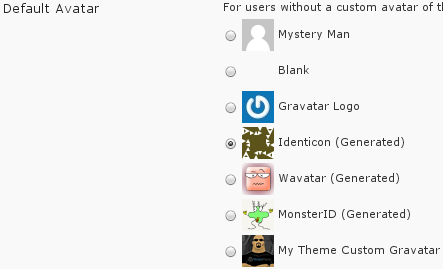
The default avatar setting list with a custom image "My Theme Custom Gravatar" added to the list Simply select your custom image, and save settings.
Voila! We’ve just implemented everything from the Nenuno Creative tutorial, in a way that uses, rather than bypasses, core WordPress functionality.
-
Twitter Updates for 2010-09-25
- @LovinBlue as I've said: I'd be just fine with Wayne/Collie/Clark/Eldridge/Addai in 2TE set all day against DEN. in reply to LovinBlue #
- @Jpeezy25 you're my #fantasyfootball starting CB this week. Go tame some Broncos, eh? in reply to Jpeezy25 #
- @devinsays thank you – especially today, I greatly appreciate that! (cc: @jellybean @frumph @feckitorg) in reply to devinsays #